

Docs 00-shared THEMES.md
Substratal themes
The Hub ships five light and five dark themes on every platform. The defaults are L3 Moss Paper (light) and D4 Forest Floor (dark). Every reference screen and mockup is rendered in both defaults. Users can switch to any of the other themes in Settings › Appearance (SET-01).
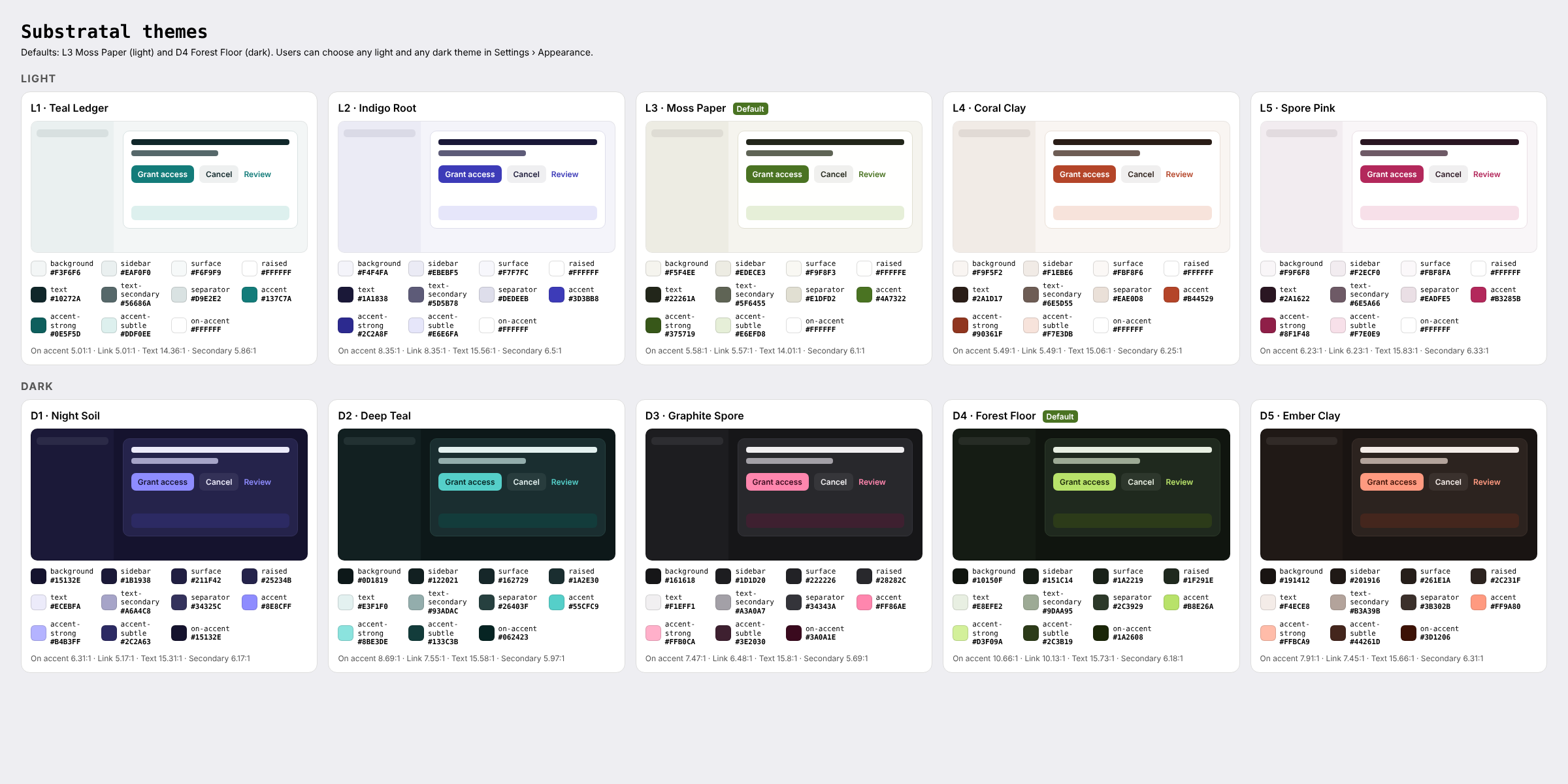
1. What the user controls
| Setting | Values | Stored in | Default |
|---|---|---|---|
| Appearance | Light · Dark · Match system | Settings.theme (light / dark / system) via PATCH /users/me/settings |
Match system |
| Light theme | teal-ledger, indigo-root, moss-paper, coral-clay, spore-pink |
app_hub per-app setting appearance.light_theme via PATCH /users/me/apps/app_hub/settings |
moss-paper |
| Dark theme | night-soil, deep-teal, graphite-spore, forest-floor, ember-clay |
app_hub per-app setting appearance.dark_theme |
forest-floor |
Resolution:
- Dark is used when Appearance is Dark, or when it is Match system and the OS is currently dark. Otherwise light is used.
- Dark uses the chosen dark theme and light uses the chosen light theme.
- Theme choices are independent: a user can pair any light theme with any dark theme.
Persistence:
- A change applies instantly and is written to the local cache first.
- It is then synced with
If-Match. On 409, re-fetch and re-apply; on 422, revert and show a toast. - On launch, the cached values are applied before first paint, then reconciled with the server.
- A missing or unknown id falls back to the default for that mode. Keys are lowercase kebab-case.
The app_hub settings_schema must declare the two keys; see OPEN-QUESTIONS #22. Until it does, store them on the device only.
Other apps on the platform are unaffected. They read Settings.theme only, as before.
2. Token roles
Every platform implements the same roles. Names come from themes/themes.json.
| Role | Used for |
|---|---|
background |
Window or grouped background (iOS grouped, Android surface, Windows Mica tint) |
sidebar |
Sidebar and navigation rail (macOS, Windows, GNOME, web) |
surface |
Subtle cards, group backgrounds, app tiles |
raised |
Content panes, list cells, text fields, dialogs, menus |
text / text-secondary / text-tertiary |
Primary text and icons / captions / placeholders and disabled only |
separator |
Hairlines, borders, table rules |
accent |
Primary buttons, switches, checkboxes, focus ring, selected chips, the macOS selected row, tint |
accent-strong |
Hover and pressed accent; the tint under Increase Contrast; link text where accent is below 4.5:1 on light |
on-accent |
Text and icons on accent fills (dark ink on the bright dark-theme accents) |
accent-subtle |
Selected rows (non-macOS), info banners, the selected inbox item |
link |
Link text |
control-fill / control-fill-strong |
Secondary buttons, search fields, segmented tracks / progress tracks |
scrim + scrim-opacity |
Modal scrims |
Not themed (the same in every theme):
- Status badge colours (
status-semantics.json, light and dark sets) - Danger red
- The logo and app icon (
brand/) - Third-party app icons
- Avatar hues
3. Palettes
Light
| Theme | id | Background | Sidebar | Surface | Raised | Text | Secondary | Separator | Accent | Accent strong | Accent subtle | On accent | |
|---|---|---|---|---|---|---|---|---|---|---|---|---|---|
| L1 | Teal Ledger | teal-ledger |
#F3F6F6 |
#EAF0F0 |
#F6F9F9 |
#FFFFFF |
#10272A |
#56686A |
#D9E2E2 |
#137C7A |
#0E5F5D |
#DDF0EE |
#FFFFFF |
| L2 | Indigo Root | indigo-root |
#F4F4FA |
#EBEBF5 |
#F7F7FC |
#FFFFFF |
#1A1838 |
#5D5B78 |
#DEDEEB |
#3D3BB8 |
#2C2A8F |
#E6E6FA |
#FFFFFF |
| L3 | Moss Paper (default) | moss-paper |
#F5F4EE |
#EDECE3 |
#F9F8F3 |
#FFFFFE |
#22261A |
#5F6455 |
#E1DFD2 |
#4A7322 |
#375719 |
#E6EFD8 |
#FFFFFF |
| L4 | Coral Clay | coral-clay |
#F9F5F2 |
#F1EBE6 |
#FBF8F6 |
#FFFFFF |
#2A1D17 |
#6E5D55 |
#EAE0D8 |
#B44529 |
#90361F |
#F7E3DB |
#FFFFFF |
| L5 | Spore Pink | spore-pink |
#F9F6F8 |
#F2ECF0 |
#FBF8FA |
#FFFFFF |
#2A1622 |
#6E5A66 |
#EADFE5 |
#B3285B |
#8F1F48 |
#F7E0E9 |
#FFFFFF |
Dark
| Theme | id | Background | Sidebar | Surface | Raised | Text | Secondary | Separator | Accent | Accent strong | Accent subtle | On accent | |
|---|---|---|---|---|---|---|---|---|---|---|---|---|---|
| D1 | Night Soil | night-soil |
#15132E |
#1B1938 |
#211F42 |
#25234B |
#ECEBFA |
#A6A4C8 |
#34325C |
#8E8CFF |
#B4B3FF |
#2C2A63 |
#15132E |
| D2 | Deep Teal | deep-teal |
#0D1819 |
#122021 |
#162729 |
#1A2E30 |
#E3F1F0 |
#93ADAC |
#26403F |
#55CFC9 |
#8BE3DE |
#133C3B |
#062423 |
| D3 | Graphite Spore | graphite-spore |
#161618 |
#1D1D20 |
#222226 |
#28282C |
#F1EFF1 |
#A3A0A7 |
#34343A |
#FF86AE |
#FFB0CA |
#3E2030 |
#3A0A1E |
| D4 | Forest Floor (default) | forest-floor |
#10150F |
#151C14 |
#1A2219 |
#1F291E |
#E8EFE2 |
#9DAA95 |
#2C3929 |
#B8E26A |
#D3F09A |
#2C3B19 |
#1A2608 |
| D5 | Ember Clay | ember-clay |
#191412 |
#201916 |
#261E1A |
#2C231F |
#F4ECE8 |
#B3A39B |
#3B302B |
#FF9A80 |
#FFBCA9 |
#44261D |
#3D1206 |
The full set, including derived roles, is in themes/themes.json and themes/themes.csv.
4. Contrast (WCAG 2.2 AA, checked for every theme)
| Theme | On accent / accent | Link / raised | Text / background | Secondary / raised | Secondary / background |
|---|---|---|---|---|---|
| L1 Teal Ledger | 5.01:1 | 5.01:1 | 14.36:1 | 5.86:1 | 5.39:1 |
| L2 Indigo Root | 8.35:1 | 8.35:1 | 15.56:1 | 6.5:1 | 5.93:1 |
| L3 Moss Paper | 5.58:1 | 5.57:1 | 14.01:1 | 6.1:1 | 5.54:1 |
| L4 Coral Clay | 5.49:1 | 5.49:1 | 15.06:1 | 6.25:1 | 5.77:1 |
| L5 Spore Pink | 6.23:1 | 6.23:1 | 15.83:1 | 6.33:1 | 5.9:1 |
| D1 Night Soil | 6.31:1 | 5.17:1 | 15.31:1 | 6.17:1 | 7.53:1 |
| D2 Deep Teal | 8.69:1 | 7.55:1 | 15.58:1 | 5.97:1 | 7.59:1 |
| D3 Graphite Spore | 7.47:1 | 6.48:1 | 15.8:1 | 5.69:1 | 7.01:1 |
| D4 Forest Floor | 10.66:1 | 10.13:1 | 15.73:1 | 6.18:1 | 7.58:1 |
| D5 Ember Clay | 7.91:1 | 7.45:1 | 15.66:1 | 6.31:1 | 7.5:1 |
Contrast modes:
- Windows High Contrast,
forced-colorson the web, GNOME High Contrast: the Substratal theme is turned off and system colours apply. - macOS/iOS Increase Contrast and Android high-contrast text: tint with
accent-strong, and usetext-secondarywherevertext-tertiarywould carry information.
5. Platform implementation
| Platform | Files | Mechanism |
|---|---|---|
| iOS / macOS | theme/SubstratalTheme.swift, theme/Assets.xcassets/AccentColor |
ThemeStore (@Observable) supplies \.palette and .tint from the root modifier .substratalTheme(store); .preferredColorScheme from Settings.theme. The AccentColor asset holds the defaults for launch and UIKit/AppKit bridges. |
| Windows | theme/SubstratalThemes.xaml, theme/Themes/{Light,Dark}/*.xaml, theme/ThemeService.cs |
Theme dictionaries override SystemAccentColor*, text, fill and stroke resources and add Substratal*Brush. ThemeService swaps the Light/Dark dictionaries and sets RequestedTheme. Mica is tinted with background. |
| Android | theme/SubstratalThemes.kt, theme/res/values{,-night}/substratal_theme.xml |
Ten Material 3 ColorSchemes. SubstratalTheme(mode, light, dark) picks one. Dynamic colour is off. The XML defaults cover the splash screen and system bars. |
| Linux | theme/{light,dark}/*.css, theme/README.md |
Redefines libadwaita named colours. A single Gtk.CssProvider reloads on AdwStyleManager notify::dark; none is loaded in high contrast. |
| Web | theme/themes.css, theme/themes.ts, theme/head-snippet.html |
--sub-* custom properties keyed by data-scheme, data-light-theme and data-dark-theme on <html>. The inline head script prevents a flash of the wrong theme, and theme-color follows the theme. |
6. Previewing in the mockups
Every mockups/*.html accepts:
?mode=dark?light=<id>(any light theme)?dark=<id>(any dark theme)
For example, APP-01-home.html?mode=dark&dark=night-soil. The reference PNGs are in screens/light/ and screens/dark/.